Showing posts with label eclipse. Show all posts

Saturday, September 26, 2015

Eclipse plugin :no menu in Extension when right clicks


I'm looking at eclipse plugin and I met a problem in extension view : I can't access to the extension menu when I did right click.

I have also the following warning in Extensions View : No schema found for the “org.eclipse.ui.menus” extension point

To solves it,  I add Eclipse RCP Target Components ( see http://stackoverflow.com/questions/8366303/no-schema-found-for-the-org-eclipse-ui-menus-extension-point )

  1. In Eclipse, go to Help > Install New Software... 
  2. Update site: http://download.eclipse.org/eclipse/updates/4.5
  3. Choose "Eclipse RCP Target Components" and press Next to install them

Now the menu appears :


Eclipse IDE for Java Developers
Version: Mars Release (4.5.0)


Sunday, September 20, 2015

Grails 3 and IDE support


I'm looking at support of grails 3 by the IDE.
To now, here is an overview :
  • Eclipse : none support, plug-in disappeared from STS.
  • Intellij : appears to be support but you to pay licensing ...
  • Netbeans : begins of support
The good point is Netbeans 8.0.2 recognizes Grails 3 project.So, i was able to create a new Grails 3 project.You can launch you application and there is also syntax highlights in GSP.
However, it's just the beginning and it needs some works.But, you can begin to practice with Grails 3.

https://stackoverflow.com/questions/29441503/grails-3-0-support-in-netbeans/32425071#32425071

One comment, under Eclipse, you can import Grails project as a Gradle project like said in documentation.But, I didn't find how to have syntax highlights in GSP.

Friday, October 5, 2012

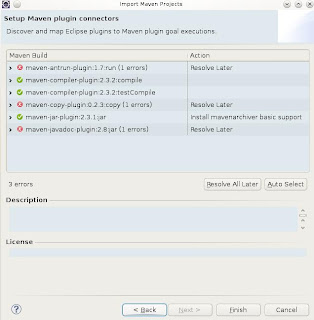
Can't import an existing Maven Project with Eclipse Juno and Maven Plugin 1.1.0

Problem

I do the following :
Import -> Maven -> Existing Maven Project
Then I choose My project on disk.


I click Next.I have the Maven Selector Plugin Screen :


If I click on Finish, I wait a long time and I finally I hava an error : Problem occured while performing ...

Solution

In Maven Selector Plugin Screen, just click on resolve All Later button.
It will permit to have the project on Eclipse and after you could resolve problem.


Monday, April 23, 2012

How to apply Checkstyle format automaticaly ?


Problem :


You want to format your code with checkstyle rule with CTRL-ALT-F.


Solution :


Right clic on the project -> Checkstyle -> Create a Formatter


Then go Windows -> Preferences -> Code Style -> Formatter 


Next, you just have to select the formatter you have created.
After that, you can make CTRL - ALT - F to format you code

Thursday, March 29, 2012

Import Existing Maven in Eclipse : project has no J on the folder project


Problem

I made the following :
- Import  Existing Maven project
- Browse -> Choose Maven project (It has pom Module)

Then I saw in Package Explorer, that my project has a M for Maven but has no J for Java Project !
And therefore package are not managed .

Solution 

Right Clic --> Configure --> Convert to facet form

Friday, August 19, 2011

GWT and Eclipse : Unable to find a module


Problème :

When I launch my application in Eclipse, I have the following error :

Loading modules
   de.toolforge.googlechartwrapper.googlechartwrapper
      [ERROR] Unable to find 'de/toolforge/googlechartwrapper/googlechartwrapper.gwt.xml' on your classpath; could be a typo, or maybe you forgot to include a classpath entry for source?
[ERROR] shell failed in doStartup method

I check all of my line of code and there is no references to this module.

Solution :

In Eclipse :

Run -> Run Configurations
Go in  Arguments tab.

Then you have to delete the bad module.For me :
   de.toolforge.googlechartwrapper.googlechartwrapper

Sunday, July 3, 2011

Eclipse : Can not find the tag library descriptor for "http://java.sun.com/jsf/core"

Problem :

In Eclipse, I have the following error : Can not find the tag library descriptor for "http://java.sun.com/jsf/core"

Solution :

I add this dependencies for having the jat in Eclipse classpath :

<dependency>
  <groupId>com.sun.faces</groupId>
  <artifactId>jsf-api</artifactId>
  <version>2.0.0-Beta2</version>
</dependency>

Saturday, July 2, 2011

Can not find the tag library descriptor for "http://java.sun.com/jsf/html"

Problem :

I have the following error in Eclipse : Can not find the tag library descriptor for "http://java.sun.com/jsf/html"

Solution :

Add the following for having the jar in Eclipse classpath :

<dependency>
  <groupId>com.sun.faces</groupId>
  <artifactId>jsf-impl</artifactId>
  <version>2.0.0-Beta2</version>
</dependency>

Wednesday, June 29, 2011

Can not find the tag library descriptor for "http://richfaces.org/a4j"


Problem :

My jsp contains the following line:

<%@ taglib uri="http://richfaces.org/a4j" prefix="a4j"%>
<%@ taglib uri="http://richfaces.org/rich" prefix="rich"%>


And Eclipse show the following error : Can not find the tag library descriptor for "http://richfaces.org/a4j"

Solution :

I add these dependencies for having jars in Eclipse Classpath :

<dependency>
<groupId>org.richfaces.framework</groupId>
<artifactId>richfaces-impl</artifactId>
<version>3.3.0.GA</version>
</dependency>
<dependency>
<groupId>org.richfaces.framework</groupId>
<artifactId>richfaces-impl-jsf2</artifactId>
<version>3.3.3.Final</version>
</dependency>
<dependency>
<groupId>org.richfaces.ui</groupId>
<artifactId>richfaces-ui</artifactId>
<version>3.3.3.Final</version>
</dependency>